


I've written before about our broader AI adoption at SafeRide Health — the budget lessons, the model selection standards, the cultural shift. This post is different. This is about the day-to-day. What I actually do with AI, how I use it, and the infrastructure we've built that makes it work.
The Agentic Dev Platform: One Roof, Every Repo
The most impactful thing we've done isn't a model choice or a prompt template. It's structural.
We put all of our web applications — every microservice, every API, every frontend — under a single base directory. This is what we call our agentic dev platform.
Here's why that matters.
When a feature or a bug crosses project boundaries — and in a microservices architecture, they frequently do — the old way meant juggling. You'd have one editor open for the user microservice, another for the microservice it calls, and you'd be mentally context-switching between them. You'd make a change in one repo, switch windows, check if the other repo needs a corresponding change, switch back. Things get confusing fast. Things get missed.
With every project in the same base directory, the agents have full visibility into all of our code. If a bug fix spans two microservices, the agent just handles it. It doesn't need separate windows or workspaces. It sees the user microservice and the downstream service it talks to in the same context. It traces the call across repos, identifies what needs to change on both sides, and implements the fix in one pass.
That sounds simple, but it's genuinely transformed how we work. The friction of cross-repo changes — which used to be the most tedious part of my day — is mostly gone.
Cursor: My Daily Driver
On a day-to-day basis, I work in Cursor. It's my primary tool for AI-assisted development.
Here's what I use it for:
- Daily development tasks: Writing features, implementing bug fixes, refactoring code — the routine work that fills most of my day. Cursor handles the heavy lifting while I focus on planning and review.
- Investigating bugs: Something breaks, I hand the agent the context and let it dig.
- Researching code: When I need to understand how a feature works end-to-end across services.
- Understanding unfamiliar code: I've been an engineer for over 20 years, but I still encounter code I've never seen before — especially in repos owned by other teams. Cursor helps me get up to speed quickly.
- Processing logs on lower environments: This one has been a life saver, and it deserves its own section.
The Request ID Workflow
This is the scenario that best illustrates how AI has changed my daily work.
An issue gets reported. QA provides me with a request ID. I open Cursor and tell the agent: "Investigate this request on staging."
That's it. That's the whole instruction.
The agent goes through all of the logs, follows the request through every service it touched, and provides me with a complete timeline of what happened during the entire request lifecycle. It identifies where things went wrong, which service failed, what the error was, what the likely cause is, and where in the code to look.
This alone has been a life saver. Reading through several different application logs manually takes quite a bit of time — you're grep-ing for the request ID in one service, noting the timestamp, jumping to the next service's logs, searching for that timestamp, correlating the entries, and building a mental map of the request flow across your entire architecture. Now it takes a single prompt and a few minutes of waiting.
That's not a minor efficiency gain. That's a fundamentally different way of working.
Custom Skills: Teaching Agents the Rules
Over the last few months, we've built a collection of custom skills that guide how our agents operate. These aren't just prompt snippets — they're operational guardrails that shape what the agent can and cannot do.
No Production Allowed
The most important skill we've created is called no-production-allowed. The rule is exactly what it sounds like: agents do not have permission to connect to our production environments.
No parsing production logs. No managing production containers. No querying production databases. Nothing.
This isn't just about caution — it's about compliance. We deal with healthcare data. HIPAA rules are in place for a reason, and feeding protected health information (PHI) or personally identifiable information (PII) into an LLM is a line we will not cross. The no-production-allowed skill makes sure the agent knows that boundary and respects it without exception.
The agents can still be enormously useful on lower environments — staging, dev, QA — where the data is synthetic or sanitized. That's where the log investigation and container management work happens. Production stays off-limits.
But here's the thing — even though the agent can't touch production itself, the no-production-allowed skill makes it aware of that constraint. So when I need something from production, the agent provides me with the exact queries I need to run. I tell it what I'm looking for, it crafts the SQL or the log search commands, and I execute them myself against production. The agent helps me narrow down the results and find the critical data we're looking for without ever touching the production database itself. It's a clean separation: the agent does the thinking, I do the executing.
Context Skills
We have around 25 skills in place now, and this number only seems to be growing. Every time we identify a repetitive workflow or a context gap, we build a skill for it. The collection has become a living layer of operational knowledge that makes the agents more useful the more we add to it.
When an agent knows that Service A calls Service B through a specific API contract, and it can see both services' code in the same workspace, it can reason about changes in a way that just isn't possible when projects are siloed.
TDD with Vertical Slices
We use a skill for test-driven development with vertical slices. Instead of writing a massive test suite after the fact or building out an entire feature before touching tests, this skill guides the agent to work in thin vertical slices — write a test, implement just enough to pass it, move to the next slice. It keeps the development cycle tight and ensures every piece of functionality is covered as it's built, not retrofitted later.
Jira Integration
We have a jira-tickets skill for creating and interacting with Jira directly from the agent. Instead of context-switching between my editor and the Jira browser interface, I can have the agent pull ticket details, update statuses, and create new tickets as part of the workflow. It keeps the conversation with the agent grounded in the actual work items we're tracking.
Time Tracking (No More Clockify)
This one is personal — I built it myself. I created a time-tracking skill that starts and stops timers when I'm working on tasks and automatically reports those time blocks to Jira for our work log integration.
Before this, time tracking was a hassle. We used to have to just jot down estimated hours for tasks. I took it a step further and used Clockify, tracking my time there and then manually entering it into Jira tickets every week. It was tedious, error-prone, and honestly just felt like busywork.
Now? The agent handles it. I tell it I'm starting work on a task, it starts the timer. When I'm done, it stops and logs the time directly to the corresponding Jira ticket. No more manually tracking time with Clockify in the browser. No more Friday afternoon ritual of trying to reconstruct what I worked on and for how long.
Time tracking is not a hassle anymore.
This skill alone saves me around 2 hours each week — time I used to spend manually tracking time and logging it in Jira. And it turns out the tracked hours have value beyond just my own record-keeping. Our billing team has found that they can use our tracked hours — my guess would be a write-off or some other way to save the company on its bottom line. Either way, the data is more accurate now because it's captured in real time rather than estimated after the fact.
Grill-Me: Stress-Testing Plans Before Implementation
Before I write a single line of code for a bug fix or a new feature, I start with a plan. I sit down with the AI agent, explain the feature or the issue, point it at where we might start looking in the code, and lay out the business rules surrounding the work. The agent drafts a plan.
Then I tell it to grill-me.
The grill-me skill — created by Matt Pocock — is one of the most valuable additions to our platform. When I invoke it, the agent stops treating the plan as finished and starts interrogating it. It asks me questions. Lots of them.
The goal is simple: make sure the agent and I have a shared understanding of the work at hand before any implementation begins. The agent might ask about edge cases I hadn't considered. It might ask for clarification on a business rule I described vaguely. It might challenge an assumption in the plan that I made without realizing it.
I've had the agent ask me upwards of 20 questions to gain additional clarity for a task. I've heard stories of it asking over 50. Every question and answer expands the context the agent has — it fills in the gaps that a plan written in five minutes would inevitably leave behind.
This skill alone has helped a lot in finding critical gaps in a plan the agent created and thinks is 100% ready for implementation. Because here's the thing: the agent will happily produce a plan that looks complete, reads well, and feels thorough — and still be missing something important. The grill-me skill is what surfaces those missing pieces before you're halfway through implementation and realize the plan didn't account for a critical edge case.
It's been a welcomed addition to our platform, and it's now a standard part of my workflow for anything non-trivial.
MCP Connections: Database, Jira, and More
Beyond skills, we've set up MCP (Model Context Protocol) connections to a range of services that the agents can interact with directly: our databases, MongoDB, Jira, Context7, and Obsidian.
These MCP connections mean the agent isn't just reading code — it can query a database to understand a schema, pull a Jira ticket into context, or look up documentation through Context7 without me leaving the editor. It turns the agent from a code-aware assistant into something that's connected to our entire development ecosystem.
Obsidian: My Second Brain
I only started my second brain journey on March 6, 2024 — less than two and a half years ago. The graph view below — what I call my second brain — shows how all of my documents link to each other:
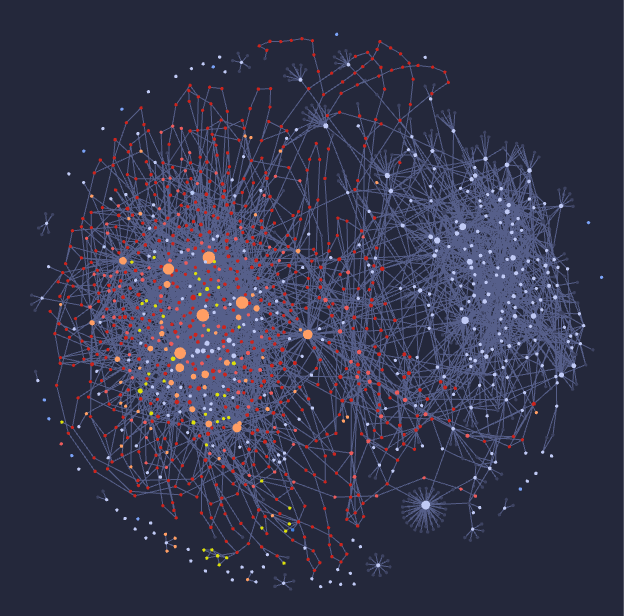
What started as a handful of daily entries has grown into a dense web of interconnected knowledge about our system, our features, our bugs, and our decisions. We also have a PII protection rule in place that stops PII from being added to my daily notes — the same HIPAA-conscious thinking behind our no-production-allowed skill applies here. My notes capture the work, the decisions, and the technical context, but never patient data.
I use Obsidian for my daily notes, and the MCP connection to it has become one of my favorite parts of this whole setup.
My daily note template includes scripts that are triggered automatically when today's note is created. These scripts do several things:
- Summarize the previous day's work — a recap of what I accomplished, what I was working on, where things stand.
- Pull in my meetings from my calendar — so I start the day with my schedule already laid out in front of me.
- Populate a list of code reviews completed in GitHub the prior day — a running log of review activity without having to go look it up.
- Pull time tracking work logs from the previous day — a worklog that outlines how much time was spent on each task and how much was spent total working on tasks, populated directly from the time-tracking data logged to Jira.
Here's the part I'm most happy about: the summarization runs on local Ollama models. I'm not using company API budgets for my daily note summarizations. The summaries are generated by a model running on my own machine, which means I can run them every day without thinking about cost. It's a small thing, but it's the kind of decision that adds up — keeping personal workflow tasks on local models while reserving the paid models for the work that actually needs them.
The result is that every morning when I open my daily note in Obsidian, the previous day's note is summarized and populated with all of this data. Today's note is not updated with any data — creating today's note simply triggers the Python scripts that ensure the previous day's note is completed.
It's worth noting that all of these interactions — outside of me explicitly saying "update my daily note with what we completed" — go entirely through scripts and local Ollama models. Nothing goes through the SafeRide AI accounts. The only part that is summarized by the Cursor agent is when I tell it to update my note with what we accomplished. When I do that, it adds a block explaining the work I completed, links the plan and pull requests if they exist, and then those blocks are used the next day when the scripts summarize the work completed.
This separation matters to me. The automated parts run on my own hardware at zero cost. The parts that use paid AI budget are intentional and initiated by me, not running in the background.
Having the agent connected to all of this through MCP has been a game-changer for one specific reason: searching past work.
Issues come up that have been addressed before — sometimes multiple times. Before this setup, I'd find myself re-investigating a problem I'd already solved six months ago, trying to remember what the fix was, which files I touched, why I made a certain decision. Now the agent can search my notes and find the answer.
The agent sees all of the notes on what was completed. My daily notes include links to the Cursor plans created for each feature, so the agent can see exactly what was implemented. They include links to the GitHub pull requests. They include the business context, the decisions made, the edge cases encountered. Full visibility into past work is very nice — instead of relying on my memory or digging through old Slack messages, the agent pulls the relevant notes into context and we're immediately up to speed.
What This Adds Up To
None of this is accidental. The agentic dev platform, the custom skills, the production guardrails, the log investigation workflow — these are all pieces of an intentional setup designed to get the most out of AI while respecting the constraints of healthcare software development.
The agents aren't replacing my judgment. They're extending my reach. I can investigate faster, understand code more quickly, and handle cross-repo changes without the cognitive overhead of managing multiple workspaces. The no-production-allowed skill ensures we stay on the right side of HIPAA. The unified workspace ensures the agents have the context they need to be genuinely useful.
I still review every line of code the agent produces. I still make the judgment calls on architecture and approach. But the mechanical work — the tracing, the searching, the cross-referencing — that's largely handled now.
I should also be clear about what we don't do. We do not yet run any autonomous agents that work off of Jira tickets on their own. We steer the agents. We do our planning with the agents so that we remain in the loop. The agent is a collaborator, not an autonomous worker — and that's intentional. In a healthcare environment where correctness matters, keeping human judgment in the loop isn't a limitation, it's a design decision.
We have looked at OpenClaw and Hermes for an engineering setup where the agent could have its own kanban board and work through tickets autonomously. It's a compelling idea — but right now we feel that's moving faster than we want to. Maybe one day in the future we will have some autonomous agents fixing bug tickets while engineers focus on architecting and designing new features. But we're not there yet, and I'd rather get the human-in-the-loop workflow nailed down before we start handing over the keys.
For a veteran engineer who spent two decades writing his own code, this has been an adjustment. But I can't argue with the results. I'm more productive, I understand our system more broadly, and I can focus my energy on the parts that actually require human judgment.
The tools will keep evolving. The models will keep improving. But the foundation we've built — full codebase visibility, operational guardrails, and a workflow that keeps humans in the loop — that's what makes AI genuinely useful in my day-to-day work as an engineer at SafeRide Health.
Comments